Often when students are assigned a reading, they gloss. They will see a name, a term, a concept… and skip it. Not because they aren’t engaged. Not because they don’t want to learn. But because it is one of seven articles to have read by the end of the week.
Put simply, collaborative annotation is taking notes on a document with other people. It is an opportunity for students to engage in active reading, cultivate note-taking practices, replace the repetitive discussion boards, and ground conversations in the text itself.
Pedagogically, what is its value?
What collaborative annotation adds to the classroom is an opportunity to be deeply rooted in the text. It’s collaborative so there is no longer pressure solely on one student. They can also engage with one another and ask questions, clarify thoughts and difficult quotes, etc.
Dr. Sarah Bogue, Director of Digital Learning and Professor in the Practice of the History of Christianity here at Candler suggests four ways to engage collaborative annotation:
Glossing – Students are required to write a short blurb identifying authors, theories, etc. that are referenced.
Asking Questions – Students can identify concepts or passages that were confusing to them, or offering opinions and making connections with the other material.
Jigsaw-ing – Different students are responsible for annotating different sections of the reading, asking questions, identifying themes, etc.
Deconstructing – Close reading can involve identifying arguments and evidence, looking for broader contextual clues, identifying rhetorical moves
Hypothes.is
Hypothes.is is a browser plug-in that allows for collaborative annotation on any web-hosted content (blogs, sites, articles, ebooks). This means that it can be used within the Pitts Theology Library Course Reserves and does not violate any copyright laws because it never leaves the browser you’ve used to access the reading.
Hypothes.is lets you annotate in layers:
Hypothes.is has three different levels of annotation available to different audiences: personal, community/class, and public. You are able to be Active, Visible, and Social, respectively.
First, personal. Hypothes.is calls this the “active” participation. In this view, notes you personally make are visible only to you. Annotations can be made privately, viewable only by the student who made them.
Second, class/community use. Hypothes.is calls this the “social” use. Annotations can be made in groups or with an entire class. This is made possible by adding each email address to collaborate on the document.
Third, public use. Hypothes.is calls this the “visible” use. Annotations can be made publicly. Anyone who wishes to engage in this view can participate in public conversations on any document viewed in an internet browser with the plugin.
Perusall
Perusall is a stand-alone website that allows for collaborative annotation as well as assignments, a variety of analytics, etc. Persuall acts as a sort of Learning Management System in which you as the user have to upload all of the documents for annotation yourself. This can be tricky, given copyright concerns happening right now throughout academia.
Perusall is solely for community use, meaning you cannot annotate a text that is only visible to an individual user. The system is organized by “class” where you are able to invite anyone to your class, but only members of the invited class can see the annotations.
Conclusion: Collaborative Annotation Workshop
The video below is from the Office of Digital Learning at Candler School of Theology. It was part of the 2020-2021 “Winter Workshops” series. In this session, Dr. Sarah Bogue discusses brainstorming and ideas for collaborative annotation and explores both Hypothes.is and Perusall annotation tools. Check it out!
In March of 2020, the world of higher education shifted from teaching classes on campus to Emergency Remote Teaching — How do we take exactly what we do in the classroom and teach effectively online? Online education has often been looked down upon because of the assumption that it does not generate the same interactive and generative environment as face-to-face instruction.
This post explores the use of digital whiteboards in the classroom and examines four different options you can incorporate into your teaching, both in-person and online.
Using Whiteboards in the Classroom
Every digital tool that we use in the classroom needs to have a purpose. We are not simply using tools because we can. If adding a digital tool isn’t helpful for your style of pedagogy, don’t feel like you have to restructure how you teach in order to use it!
Online whiteboards are helpful additions to a classroom for brainstorming, breakout sessions, online collaboration and student contribution, and for presentations. Whiteboard can be added to any lecture or presentation, in any mode of delivery, anytime you want to engage your students.
Feel free to scroll down for helpful presentation and workshop by the Office of Digital Learning at Candler School of Theology called “Better Whiteboards.”
1) Zoom Whiteboard
Do you want to collaborate without leaving the Zoom room?
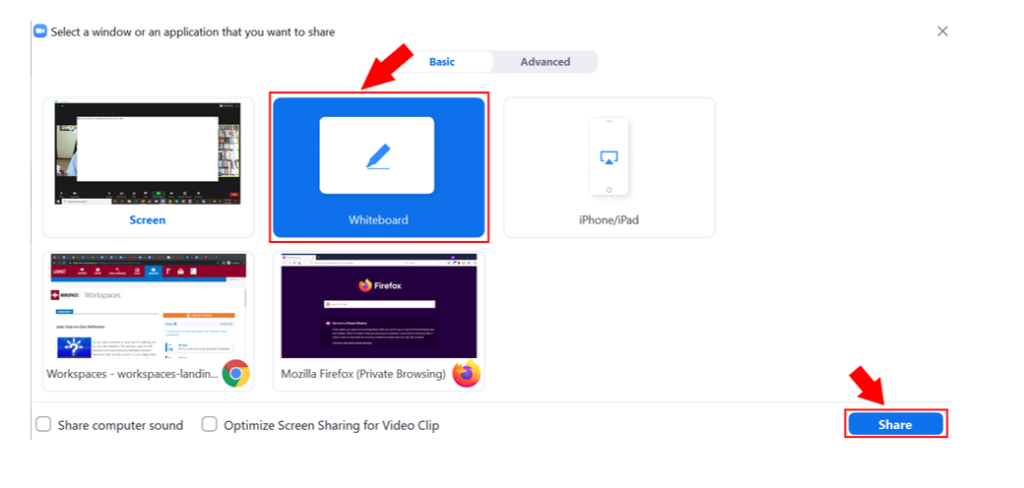
Built into the Zoom platform, there is a whiteboard feature when sharing your screen.
By following the directions in the image above, you will share with the participants a blank white screen.
Next, you will need to instruct where to find the annotation function. This is how students will be able to use the whiteboard in real time.
When viewing a shared screen, navigate to the top of your screen and hover your mouse until you see “You are viewing ___’s screen.” and click on View Options to the right.
Choose “Annotate.”
You will see an annotation toolbar at the top with the ability to draw, type, stamp, and erase.
Do you want to use a board that is user-friendly and familiar?
Google Jamboard is an application in the G-Suite. It is accessible via an app or online using a link.
For the students, there is no sign up needed in order to access the shared board. It includes options for drawings, text, google image search, shapes, and so much more.
For those who do use their personal Google accounts to sign in, you can upload files and images, as well as appear as yourself when collaborating in real time.
Do you want a board that is more interactive and invites more constructive engagement?
Padlet is an online whiteboard that is best for creating collaborative repositories for class resources. It can also be used to liven a lecture by gathering feedback via the rank voting “up and down” system.
Participants engage each board by creating various boxes. Each box acts as a “post” and can hold text, images, links, files, sounds, videos, live recordings, etc.
To use Padlet, you begin with several blank board templates to choose from:
Wall – Brick-like layout
Stream – Streamlined content like social media feed
Do you want to learn a whiteboarding program that is used in various professional and corporate settings?
Miro is a collaborative whiteboard that is used by corporate teams, educators, and anyone who wants an open and endless canvas to organize their thoughts. Click here to read more.
Associate Professor of American Religious History, Alison Greene, teaches a course called “History of Christianity in America.” In her course, she assigns a cultural analysis project through the lens of Jesus and John Wayne: How White Evangelicals Corrupted a Faith and Fractured a Nation by Kristen Kobes Du Mez.
In this text, Du Mez provides a history of 20th century gender and evangelicalism. Students are asked to choose a “contemporary cultural item” – aligning with or resisting this framework by Du Mez.
What does this look like?
In a 750-1000 word essay, Dr. Greene invites her students to engage with Du Mez and follow her framework as they provide an analysis of their contemporary cultural item – “an object, a film, a meme – the sky’s the limit.”
Contemporary Cultural Item Rubric:
Begin with an introductory overview of your argument about the religious and gendered meaning or implications of your chosen cultural item, building on Du Mez’s history of white evangelicalism and gender in the 20th century.
Summarize Du Mez’s argument about religion and gender in white evangelicalism, and then focus in particular on the aspects of it relevant to your own topic.
Offer a description of the cultural item you have chosen. Describe how it engages themes of religion and gender.
Describe the meaning, nature, purpose, and/or audience of your chosen cultural item (as relevant):
What is its origin? Who created it? What is its history?
Where is it located? Who will see/hear/experience it?
For whom is the cultural item intended? What messages does it communicate?
Read your cultural item alongside Du Mez:
How does the item embody or challenge Du Mez’s argument about white evangelicalism and gender?
How does Du Mez’s analysis illuminate the item’s history, meaning, and/or audience?
In this assignment, students are encouraged to think about the real-world implications of the “History of Christianity in America” course and to ground these implications in conversation with Du Mez. What is excellent about this essay is that it provides a means of assessing student comprehension as well as their ability to apply the content in meaningful ways.
In her course, “Introduction to Practical Theology,” Susan Reynolds invites her students to explore what it means to “do theology in context.” She says, “As they negotiate the fluid, shifting boundary between theology and practice, they encounter a wide and interdisciplinary variety of texts.”
In place of the weekly “one-pager” response or reflection of the weeks discussion and readings, Dr. Reynolds assigns “Meditations.” These practical papers allow students the room and flexibility to sit with a text – to let it be generative and provide “creative scholarly expression through visual, written, and spoken arts.”
1. Your Dangerous Memory
After reading Johann Baptist Metz’s essay “Communicating a Dangerous Memory” and M. Shawn Copeland’s “Memory, #BlackLivesMatter, and Theologians,” write about a “dangerous memory” of your own. What is a specific experience that compelled you to study theology or that has indelibly shaped the way you approach this work? What theological questions does this memory raise for you? This may be an experience that you personally had, and/or one that you are bound up with in some other way, as through ancestral memory or national belonging. Or, in Metz’s terms, what are you doing “theology after”?
Purpose: Demonstrate understanding of “dangerous memory” by applying the idea to your own life and experience.
Aim for: Specificity, clarity, power
2. “What would they say?”
Nearly every text written on religious practice cites Bourdieu, MacIntyre, or both, so it is important to understand the basics of their theories of practice. For this assignment, select either Bourdieu or MacIntyre. Now select some specific, ordinary practice—it could be part of your work or life as a student, ministry, sports, music, worship, family life; anything. Write a one-page analysis of that practice as though you were the thinker you’ve selected. Imitate their style (this can be fun), raise the questions they would raise, draw the conclusions they would draw. Your title should be the name of your selected thinker and your practice—e.g. “Bourdieu on Playing Jazz;” “MacIntyre on Teaching Religious Education.”
Purpose: Demonstrate that you understand Bourdieu’s or MacIntyre’s conception of practice
Aim for: Clarity and brevity. This is short—get right to the point.
3. Theology from a Place
In Suffering and Salvation in Ciudad Juarez, Nancy Pineda-Madrid does theology from the borderlands of El Paso. In Landscapes of the Sacred, Belden Lane begins from Ghost Ranch, NM. Where do you start from? What is your locus theologicus—the place from which your theologizing emerges? You can make this as vivid, creative, and poetic as you desire. Alternatively, you may choose to submit this assignment as a poem, recorded spoken-word piece, or original artwork. Please accompany visual art with a short description or explanation in which you clarify the connection between the piece and the spirit of the assignment.
Purpose: Describe how place has influenced your own theological identity, method, and questions, citing Pineda-Madrid and/or Lane as they are relevant.
Aim for: Vivid and evocative description, theologicalconnections
4. Scrutinizing a Practice
After reading and discussing Lauren Winner’s The Dangers of Christian Practice, select a particular practice from your own ecclesial/church community and “read” it like you would a text. If you do not belong to an ecclesial community, select an ecclesial practice with which you’re very familiar, or perhaps a Candler community practice. In your meditation, do the following three things:
Describe the practice in detail, as you would to one who is not familiar with it. (Don’t assume anything – practices like baptism and communion, for example, look very different in different communities!)
What is the implicit theology or ecclesiology it communicates? In other words, what is the operative understanding of God and church that seems to be at the root of this practice?
What is its “characteristic damage”? In other words, how does (or can, or might) it specifically go wrong, extending violence rather than promoting healing? Consider especially dynamics of race, gender, class, ability, and/or other dimensions of human identity.
Purpose: Demonstrate understanding of Winner by applying her understanding of the capacity of sin to distort Christian practices to your own context
Aim for: Critical thought, clear connections to the text
5. Public Theology
Select one eulogy from John Lewis’ funeral service and watch it closely, perhaps several times. Weaving in connections to Lewis and the speaker(s), write a one-page reflection responding to the following question: In your opinion, what is the role of theology in public life?
Purpose: Broaden your thinking beyond our course to theology’s many publics.
Aim for: Thoughtfulness
Why use practical papers?
Reynolds writes, “Clarifying both the explicit purpose and the goals (“aim for”) of each meditation encourages creativity: there is great room for flexibility within these outcomes and guidelines, and students can shape the work in ways that are vocationally and intellectually meaningful for them. Students have tended to find these assignments productive, enjoyable, and worthy of their time.”
Rather than assign a traditional approach to reading reflections, why not explore the creativity and depth of your students by asking them to “do theology in context”? They just might surprise you!
“Canvas Accessibility” Workshop Conversation — Recorded October 29th, 2021.
TRANSCRIPTION:
SARAH: Welcome, friends, thank you for being a part of our faculty workshop series. This workshop is dedicated to the idea of Canvas accessibility, but we’ll also talk a lot about the concept of accessibility and where we think it might come into play in your pedagogy.
RYAN: So we have three major takeaways for this session.
The first is to recognize that accessibility is for all learners. So we’ll touch on aspects of universal design for learning, as well as broadening our understanding of what accessibility means in general.
Our second takeaway is to recognize that accessibility is a theological invitation. So what does it look like to expand what it means to be a theological learner? And how does our particular location at a school of theology call us to seek justice in this arena?
And our third takeaway is to recognize that accessibility is already a part of canvas. Built into the learning system is a way to check for accessibility needs on your class site, as well as some general guidelines from canvas to ensure that all learners succeed.
So first, accessibility, what is it? Well, let’s start with what it’s not. Accessibility is not a list of specifications. You don’t need to ask what do I need to do to check off this box in order to satisfy legal requirements and Department of Accessibility Services requests? Rather, accessibility is about establishing a mindset, an approach that considers everyone that you teach and focuses on variations of abilities.
Next, accessibility asks that we be flexible so we don’t always know what our students are going through. Not everyone is willing to share these things even with their peers, much less with their professors. So having the flexibility in your course designed to adjust to every student’s needs and strengths is essential. And Sarah will cover some concrete examples of how to implement these small changes that make a huge difference.
And finally, accessibility cannot be an afterthought. It’s an approach to re-prioritize not just core structure and design, but to change how you see your students and what that means for your teaching.
So let’s take a moment now and do a thought exercise together on accessibility. I want you to think about a student. They could be an abstract student or someone you’ve taught recently. Outside of your classroom, what do you think theological education looks like for them? What are some particular contexts and commitments outside of Candler that the student has, and how does this shape their seminary experience?
Sarah, do you have someone in mind?
SARAH: I do, actually. There are two different students that I had in mind there in my class this semester.
One of them is a single mom who has a middle school aged child who has a full time job and has really focused her entire life on getting through seminary, despite those things. She has a lot of commitments outside of class. And that’s not even speaking to her vocational development, which is a complicated thing in her denomination. So she’s carrying a lot right now. And it’s been really helpful for her to see the space of the classroom as a respite in some ways from everything else that’s going on around in her life. But it’s not always easy for her to find that space.
The second is a student who has a young child, two young children, and he spent this semester being a stay at home parent for one of them and also working on another full time job with commitments and job responsibilities that often take away. A lot of the time he would normally have spent preparing for class.
And so I spent a lot of time this semester really thinking critically about how to make the space of the classroom a space that serves their needs as well as the needs of the other students in my class, some of whom are only students and have just left college. So the whole spectrum is really represented in that class this year.
RYAN: Yeah, those are great examples of the characteristics that we assume of our theological learners really do have implications on how we shape our pedagogical practices. And it sounds like you have shifted your classroom to be a space of not only education and academics, but respite and information and just a place where you can maximize theological education.
And so I want to take this thought exercise and move us into some theological considerations.
So the first is expanding the theological classroom. Accessibility invites us to expand what we think about the theological classroom, and it asks us to rethink who our theological learners are. What do we assume about them and what do we want them to get out of our classes?
Expanding the classroom means that we must address varying and diverse abilities in our pedagogy. In the spring of 2019, student leaders, staff and faculty across Candler advocated for a community climate assessment. This assessment was to examine how commitments to diversity and accessibility actually impacted our community. So I encourage you to look at this assessment and its recommendations to the faculty and administration. And if you don’t already have it, I will be happy to send it to you. Our role in creating accessible and inclusive learning environments is essential as we explore a justice framework as a school of theology.
And a third theological consideration is that it is an invitation to communion. When we create equal opportunity among theological learners, we are embodying communion, a common union, a shared moment where both faculty and student are impacted by the spirit of God.
SARAH: Thanks, Ryan. I think as we move into some of the practicalities of how to make our courses more accessible, it’s really important to take the theological themes that Ryan has invited us to consider and also think critically about the role that disability plays in our classrooms and at the School of Theology.
Jay Dolmage has this wonderful article that’s referenced here on the screen, and he argues that disability is central to higher education, mostly because building more inclusive schools and classrooms actually allows better education for all. A key facet of how to make that function in your classroom is a framework universal design for learning. I bet many of you have heard about universal design for learning. It’s a framework for curriculum development that aims to give all students equal opportunities and access to the learning that happens in your classroom. This includes instructional goals, methods, materials and assessments in particular that work for as many students as possible. There are three core components to universal design for learning, and those are on your screen here, multiple means of engagement, multiple means of action and expression, and multiple means of representation. And you can see all of those elements on this slide.
And another fabulous quote from Dolmage to just really ponder here for a minute is that universal design isn’t about buildings, it’s about building – building community, building better pedagogy, and building opportunities for student agency. And as we move into some of the practicalities of this, I want you to keep that idea in mind that all of these accessibility things, like Ryan said, aren’t a checklist. They’re really an invitation to building better connections between you and your students, between your students and their contexts, and between the students in the world.
So let’s break down each of these individual elements.
The first is having multiple means of engagement. This is the why of what’s happening in your classrooms. It involves helping students find motivation and cultivate persistence. This is about meeting students where they are and seeing them as whole, people that bring all kinds of things in your classroom space. This involves providing options for self-regulation, opportunities for cultivating skills of self assessment and for cultivating opportunities for personal reflection. There are lots of ways that you can consider doing that, and I’m going to say in a minute a couple of those, but I think the key here is thinking critically about how you can use an assessment mode that’s varied over the course of your semester. Are you asking students always to do the same thing and in the same format? If so, that’s going to leave a lot of students by the wayside.
So let’s look at a couple of specific examples from our faculty these past few semesters. The first is a class that Alison Greene does on contemporary American religious culture. She has an amazing project where she has students read Du Mez’s Jesus and John Wayne as part of her course requirements. After they read that book, they are asked to identify a contemporary cultural item, an object, a film, a meme. The sky is the limit for her. And she asks them to analyze that contemporary object’s meaning as it’s connected to Jesus and John Wayne. The idea is for students to think of a cultural item that encourages them to think about real world life implications of the themes of the course in general and of this particular text in particular, she says. Maybe you could choose something around gender in evangelicalism or something about resistance to that frame. And the idea here, again, is that it’s asking students to take class concepts and apply them to actual objects in their real world experience.
Susan Reynolds, practical theology intro class is a similar kind of assignment. She has students read an essay on communicating a dangerous memory and M. Shawn Copeland’s Memory, Black Lives Matter and theologians. And as part of this, she asks students to write about a dangerous memory of their own. She asked them about specific experiences that compelled them to study theology or that has indelibly shaped the way that they approach their work. She asked them what theological questions did this memory raise for you and is there in some ways a tie between this ancestral memory or national belonging or what are you doing theology for? It’s a fabulous way to connect those themes of practical theology to the lived experience and inspirational formative moments that our students bring into the classroom space and asking them to name that specifically in connection to class material.
A slightly more practical example is what Kyle Lambelet does in his skill training assignment, which is part of his political organizing course. The course examines practices of Christian Witness and in particular, ask students to provide documentation for communities wanting to do specific organizing practices. So part of what he’s invited them to do is to create a workshop handout that helps future organize, organize in communities, do a particular skill exercise like a surgical procedure, for example. And he actually is working right now with the Candler Foundry to think about ways that these skill building exercises can find a wider audience beyond the classroom space at Candler. All of these practices, these types of assessments, work to help reduce anxiety and increase engagement and motivation by asking students why they’re here and why they want to learn what they’re learning. Hopefully these assessments produce students who are purposeful and motivated.
After our understanding of engagement, the second sort of leg of the universal design for learning component is representation, and we’re going to be focusing particularly on representation on modes of delivery. The what’s the content of the learning in your classroom space? And the question here is, are you presenting information in a variety of ways while making a connection between those pieces of material? Are you only using text words? Have you considered graphs, charts, images, videos, demonstrations, Hands-On activities? And are the representations of this learning material actually relevant to your students contexts? This is an invitation for us to avoid one size fits all learning paths. Is it possible to give choices for your students and how they access information and possible opportunities, many different opportunities for students to show mastery of this kind of information?
So let’s look at some specific examples of the classroom space experience rather than assessment for this particular kind of representation. And for the first example, I’d love you to hear a little bit more about the way Beth Corrie has brought the practice of deliberative pedagogy into her classroom. Deliberative pedagogy is a specific set of teaching practices inspired by the goals of deliberation and deliberative democracy. These very scaffolded scripted classroom exercises teach students to consider viewpoints different from their own. It invites them to reflect on what their own views might leave out or give up. And most importantly, it invites them to move beyond either or thinking to integrate a variety of perspectives into new approaches that do not accept the simple us versus them position. Over the course of that particular classroom experience, students will be asked to embody different perspectives on a particular topic and conclude with some really reflective exercises on them as practitioners thinking about ways the exercises has invited them to move beyond the way they began to enter this particular subject.
Similarly, but a little bit different, you can consider roles that the ways, like a flipped classroom experience could invite your students to embody different ways of learning particular ideas. So, for example, in my classes on medieval theology, we spend one day of our week doing a fair bit of work on content, download, tell them about monastic practices. I tell them about medieval women. But on Thursdays I have them do close reading exercises, which are a core component of every history class. But I ask them to do that work through the lens of a contemporary reading practice. For example, I give them a whole series of Carolingian thinkers and I give them texts from each of these Carolingian thinkers like Alcuin and Duoda and Charlemagne and Einhard. But instead of asking them to report on those in a traditional format, I ask them to create Twitter profiles for each of these folks. I asked them to create a series of tweets with hashtags and memes related to that particular Carolingian thinker. And just the invitation to think in a different frame produces some of the most insightful close reading that I’ve seen at my time in my time at Candler. So close reading, but in a creative visual format can invite students to use the space of the classroom to really get into the content that we provided and apply it in a new and interesting way.
All of these opportunities for using the physical space of the classroom or virtual spaces, the classroom in a way that invites students to engage material in positive redundancy. So the idea here is we’re maximizing the chance that takeaways will actually be taken away by different students because we presented the material in multiple ways. Not everybody learned through a download of information, through a lecture. Sometimes a hands on activity can provide that learning experience that’s much more formative and meaningful. None of this is one size fits all, and it produces students that we hope are resourceful and knowledgeable in creative ways.
Our last leg of universal design for learning is action and expression. This is the how of learning. Are there different ways to work through the information that you provide? Are you helping students figure out how to write, how to demonstrate a skill? And can you provide tools for them to actually learn how to do this in the space of the classroom, one that we often forget? Are there options for physical action, expression and communication? Are you inviting students to think of themselves as whole, people who in assessment mode and in classroom spaces engage more than just their intellectual capacity? Are you asking students what skills are relevant to their future vocations that are also connected to your field? How is what you teach relevant to the world at large?
So let’s look at some specific examples of faculty engaging this material in meaningful ways.
We have several faculty this semester and in previous semesters who have taken the scholar blog option to help students see the relevance of the content of the class and translate that class content to a wider audience. The Scholar blog is Emory’s proprietary version of WordPress. So it’s a basic WordPress site. It gives students a practical skill of learning how to edit wysiwyg site, which all of them will have to do in the future of this digital world. But it’s also asking them to think about how to talk about what they’re learning in class, in a digital public environment.
So, for example, Amy Valdez-Barker’s Class on World Methodism talks about specific current UMC issues, and it’s designed to empower the content of this class to be a part of upcoming general conferences, empowering lay leaders and church leaders to think about the issues that are currently being talked about in this class, but shouldn’t be limited to the scope of this class. Ellen Ott Marshall had a slightly different take on this, where she had her doctoral seminar make its final papers a digital scholarship publishing opportunity, by reframing those papers in a blog format and turning it into a piece of formal public scholarship that was designed for these doctoral students’ CVs. It was a really great invitation to connection and public scholarship, all within the frame of the class itself. Lahronda Little’s class this semester is also using as an actual pastoral care blog where students process materials and things they’re going through in that class.
Another example that’s a little bit less process oriented but is a little bit practical is thinking about multiple response modes for assessments. What would it mean to instead of asking students to respond to regular IDs, instead say, hey, here’s a sample that you might see on a Twitter feed or on your Facebook feed. Respond to Aunt Karen on this Facebook feed and tell me why she’s wrong in what she understands Judaism to be or why she’s wrong and what she understands Hagiography to be. Just the invitation to a slightly different mode of expressing what they’ve learned gives students the agency and the creativity and the invitation to that creativity to take the work of your class and put it into words that are meaningful to them and their contexts. One thing I’ve done in my own class, and it’s found really, really, really interesting, is that instead of asking students to put certain things on a timeline, I’ve said, what are the five most important dates you’ve learned in this semester and why do you think those are the most important? So, again, all of these are activities are asking you to think a little bit creatively. But in doing so, you can actually provide students with an opportunity for thinking strategically and with a goal in mind. Hopefully, all of these assessment modes give students the opportunity to manage information and resources in a way that’s relevant to their own lives.
All of this is integrating a lot of digital scholarship ideas, and that’s intentional because the technology side of what we’re talking about is important as much as we’re talking about the pedagogy, multimodal assignments as in assignments, which asks students to learn certain materials and multiple ways, means that students will work with new material and they will learn that material more effectively because they’ve engaged it in multiple media. One of my favorite books, intentional tech, that you see on your screen here talks a lot about thin slices of learning. How can we ask our students not just to produce something, but to really make the process of learning and the formational sides of learning visible to you as an instructor? One fabulous example that Bruff gives an example of is a design school where students were asked to design a storefront window and the faculty person said for years, I would say I would judge these these windows on their effectiveness. And they’re the way that she felt they had accomplished their particular goals. But one semester she asked them just to write a paper explaining the choices they made that accompanied that creative activity and that opened her eyes. The more we understand about what and how our students are learning, the more responsive we can be to their learning needs. It makes something a formative assessment where we see how they process the material in addition to the ultimate product of their thinking. And it really helps students think critically and value the formative aspects of her education and not focus so much on that one final project that they get a grade on.
We’ve talked a lot in the abstract about the role of accessibility, especially in a theological institution. We also talked some about how the pedagogy of your live classroom space and your assessments can impact students. Now we’re going to move to some really practical Hands-On activities related to Canvas, all of which can help all learners, but can also particularly help and impact the experience of students who have accessibility concerns. The first thing I want to say, and I hope you hold on to if you remember none of these other details is simplicity helps everyone. A streamlined organization to your canvas site can help screen readers for students with visual issues, but also help students of all types access content. Keeping things simple and direct and chunking information into segments really can be helpful.
So the first step to that is taking your left hand navigation, which I’ve circled expertly over here on the side to be much more straightforward and streamlined. You don’t need to have every single thing out here on the left hand side of your page. The other piece is to really stream streamline your particular homepage. As you can see on this homepage, we’ve got all the crucial bits of information, my name, ways to access the class, links to library course reserves and links to student support. We also think that chunking can be particularly helpful, as you think of ways to organize the modular structure of your class.
Adding things like modules and headings within modules can really again help screen readers, but also help students access information. What do I need if I’m going back to look for things from Tuesday when we’ve got Tuesdays class recording right here and the slides from that class, we also have assignments that are built into the modules. So the modules become kind of a chronological digital syllabus that has all the things students will need when they go back to look at your classes thinking. We’ll talk a little bit later about recordings and accessibility of recordings, but I highly recommend you make recordings of the class available for anyone to see. It’s amazing how many of our students through covid said specifically that having recordings made their life a little bit less stressful. They knew if they missed something in class or in their notes, they could go back to that day and access it. So organizing this material and making material available is one of the best things you can do. Try to avoid having lots and lots of clicks to get to things. And if you have a to do list like I do here, make sure you chunk that content with headers so that screen readers can organize the material for your learners.
One of the things that I like to do is also to hyperlink things. But one of the dangers with hyperlinking is that sometimes these links get broken, especially if you copied over content from a previous site. So one of the things you might not know about in your settings is a really handy tool called validate links in content. When you click on this, it will run a process by which it tests all of the links in your site and it’ll tell you which ones are broken. This is much better to do before your semester starts than waiting for your students to say, hey, Dr. Bogue, that whole thing that you linked on that. So it’s gone. I don’t know what’s going on with that or worse, having them not tell you when that actually happens and you get. A class of students have had access to something that they haven’t had access to for a long time. In addition to the course length validator, there’s also a really interesting thing that’s been added to campus recently. And we’ll see here they found 10 broken links. They’re there on the Trump proclamation that I used to talk about Thomas Becket, it no longer exists because it’s not on the White House.gov site.
The other piece of actual tools that you can use inside canvas are an accessibility check. What this does is it it works through all of the material in your site and things critically about whether or not it’s visible to screen readers, it organizes it by easiest to fix errors only or all issues, and it breaks it down to suggestions and actual errors. So in a couple of my tables that I used for the to do list, I didn’t have table headers, which meant they weren’t organized in a way that a screen reader or a student who has processing issues would have abilities to access it. It also noted several places where the alternative text to my images was just the name of the file, which isn’t the same as an alternative text setting. So every time you’ve got images, make sure you’ve got alternative text in there as well.
The other thing I want to show you as you think about visual content is audio visual content. If possible, it is best practice to always have everything that you have transcribed so that there is an accessible way for students to read captions. This is useful for people who have auditory processing disorder, as people who are English as a second language learners and people like me who just don’t focus unless there is text on. I watch all my Netflix, all my Hulu and all my Amazon with subtitles on because that’s how I learned to focus. So you may be daunted by the option of having to to actually caption all of your material. No worries. Studio Canvas studio over here on the left hand side of the page has the option of capturing anything you’ve provided. So all you have to do is add a new piece of material. You can also record natively inside studio. Both of those options are up here on the top right corner of your screen. But if you would like to upload something, which is usually what I’ve done, a recording, I made a zoom or something else like that, all you have to do is upload that material. And then once you’re in there, you have the option to create captions or to manage existing captions. In this case, I had actually had studio process these captions and you can go through and actually edit those captions, much like you can do in the zoom transcription window.
The last bit that we wanted to talk to you about is the ability to do live transcriptions in Zoom. You may have known for a long time that Zoom would would provide transcriptions after recordings are processed. Now, there’s actually an option in your resume window to click live transcript and an A.I. interpreter will live transcript your classes as they’re happening. Of course, as with any material, not going to be perfect. And that’s OK. You can actually go back and edit that later on, as you do with any other Zoom transcript. But again, the ability to have that option available to a student in your class is a really, really great gift. The good news about this, too, is that once you turn on live transcription in the Zoom room, students can opt into or out of that service so it won’t distract students for whom subtitles really are distracting.
Thank you so much for thinking about accessibility with us. Thank you for being the kind of faculty person who’s interested in the experience that students have in your classroom space and for being open to the ways that you might make your classroom space more accessible and inviting to students. We hope that you will be in touch with us if you have questions about the content of this lecture. Ryan and I are available at any time at candlerdigitallearning [at] emory [dot] edu. We’d love to talk both big picture about the goals of accessibility that we have in theological education or about the specifics of your class. Thanks so much for joining us.
Are you interested in political organizing? How do your studies at Candler prepare you for a life of activism and public engagement?
These are main objectives of Kyle Lambelet’s “Political Theology and Community Organizing” course: to develop a working theological vocabulary in the realms of political and justice organizing and to utilize this language as they build skills and tools for the practice of organizing.
To meet these objectives, Dr. Lambelet assigns “Skill Building Presentations” to his students because “a key component of any organizer’s work is training others in the skills of social change.” In addition to these presentations, the students are asked to submit a template of their training to be published as a public resource, such as the Faith and Action Toolkit by the Candler Foundry. The goal of these training presentations is that students will have a direct outlet to apply what they are learning in class and to begin to see themselves as public intellectuals.
The assignment is completed in three parts:
Research a skill for your training.
Design a 45-60 minute training.
Lead the class in a 30 minute version of your training.
After you do your research, go out and interview at least one activist who is using your chosen skill.
2. Design your training.
After the research and interview, you will now design a 45-60 minute training on your chosen skill for a community group (church, community organization, political campaign, etc.).
This plan includes creating a training template, slide presentation materials, handouts, audio and video interviews, and any additional resources.
3. Lead your skill training.
This is a training and not a presentation. It should include hands-on exercises and aim to build skills in social change organizing. Giving all students the chance to offer at least a version of their full training lets everyone experience the facilitation from both sides – participant and leader.
So why do this assignment?
A presentation in skill building provides students with an opportunity to participate in hands-on learning, where students are actively participating in their education.
Students develop concrete skills in social change organizing.
Students are able to integrate a theological vocabulary into political organizing.
Students not only learn, but gain experience in teaching and leading in these skill presentations – preparing them to be leaders in addition to public intellectuals.
What is your theology of social media and digital usage? It may not be a bad idea to start thinking about it!
Creating values and boundaries with yourself and your digital and online usage serves as a continuous mantra, or reminder, as you spend time on your phone or computer. By checking in with how you currently use and how you want to use the digital tools at your disposal, you can start to think critically and faithfully about what makes sense for your work or ministry, and what doesn’t.
So, what is a digital tool? Digital tools are any programs, websites, or online resources that make content, specifically educational content, more accessible, deliverable, and multimodal.
What is vocation? For many, vocation is where your passion and your career intersect.
Quaker theologian Parker Palmer says in his book Let Your Life Speak, “The deepest vocational question is not, “What ought I do with my life?” It is more elemental and demanding, “Who am I? What is my nature?”
Digital tools and social media can arguably take us away from finding out who we really are and what our nature really is. So, part of our theological task in this world will be learning how to regain our agency with technology and figure out how digital tools and vocation connect for each of us.
How can digital tools and your vocational journey intersect?
They can help you to display your work meaningfully and take charge of your own storytelling.
They organize your work routines through calendars and task managers.
Utilizing digital tools in seminary can help you start to curate your own personal library for future reference.
I promise it can be fun to make use of blog sites, web portfolios, and free domains to display all your work online! For most of us in seminary it is not an easy or enjoyable process, nor is it necessarily a humbling one, to market ourselves online.
However, no one will know about that pivotal moment you overcame in Con Ed I if you don’t write about it. You may forget that you once designed and created real resources for your church to use for their sermon series if you don’t upload it, and the real kicker here is: no one can tell the story of your life, your experiences, or your values like you can.
One of the most meaningful objectives for your time in seminary is to find out how your life’s passions can intersect with your career or ministry. This balancing act between work and play can feel difficult to articulate and share during an interview, on your resume, or even on your social media accounts. However, when you utilize the potential that an online portfolio or blog has to offer—you don’t have to carry all your “in between” stories on your shoulders.
Use this online space to tell your story! When you tell the story of your work in this way, you can embrace both work and play. Display your meaningful experiences, work opportunities, or photos from your projects, trips, classes, writing assignments, internships, and sermons (or all of the above!) that you have taken part in that are simply too big for an elevator pitch, too dependent on photography and other media to describe, or maybe even too specific to put on your next resume. Your online portfolio doesn’t have to be perfect and you can always change it up as time goes on! The most important thing is that you have begun to tell your story, and this is a lifelong task.
Don’t Forget: Your Social Media accounts are theological demonstrations of your life!
My grandmother always starts unsolicited advice with, “Just a thought!” So—here is just a thought! Once others have found out that you have studied, have an interest in, or are ordained in a specific religion, the likelihood of them coming to you for pastoring, for counsel and advice, or for referral/networking purposes will most likely increase. If you are interested in a career or ministry that is focused on outreach or community building, it may be time to reflect on how others can find you online.
Everyone has a right to privacy online, full stop. Yes, even you and even your pastor and even her children. So, use your values, boundaries, and theology of social and digital media for when conversations around online presence arise in your work. Likewise, a hybrid style of working will continue to grow and ways of connection and communication are in constant flux. So, it may be crucial for you to be aware of your voice and impact informally online, especially if you choose to make your social media profiles public.
(Also—here is your permission to extend your theology of social and professional media to turning off notifications on your most distracting or used apps, reflecting on your how many times a day you really need to check your email, and maybe even utilizing network ‘parental controls’ on yourself by turning the Wi-Fi off at 5 PM or perhaps creating a weekly Wi-Fi-Free Sabbath Day.)
2. Try to Organize Your Life and Simplify Team Projects
Try to commit yourself for a set amount of time, like a month or a semester, to using various online calendars or organization platforms. Try it out, become an expert at it, then try the next one the next semester. (Just a thought: Ask your family, your partner, or maybe even your friends or roommates what they use and collaborate on your organizing efforts!)
By doing this you get to figure out how you work best with which organizational method, and now you’ve learned how to articulate what organizational style works best for you and your schedule. Your future supervisors, team leaders, and organizations will probably have a preferred calendar and organizing style when you join the team.
Knowing what your favorite is, as well as knowing how to adapt to another will help you feel less confused or lost at the beginning of your next job. Having done this work beforehand, you can begin your new job focused on the work you care about, instead of emailing IT on how to add your teammates calendar to your desktop.
Use digital tools to make collaboration easier in the work you are already doing in seminary! Maybe you are in a club on campus or in the community, participating in an internship, or just remembering you have a group project assignment due at the end of next month—try using one of the free versions of task management software out there.
Familiarize yourself with what worked best for each dynamic. Maybe informal methods of communication work best when you thought they wouldn’t, or perhaps you’ve realized you don’t need to separate tasks out as thoroughly as you once thought to be effective.
When you go into your next work setting, take the time to understand how this team has already been communicating about projects, what works for them, and what could be done differently through task management software.
Start curating your digital library as soon as possible in Seminary! Professors can sometimes spend months and even years finely cultivating their ideal syllabus for that incredibly niche, but life changing class you took last semester.
It can be easy to forget about that book your professor only assigned two chapters from, and you just needed to print it for the small group discussion last week. But once you have it your hands, something happens. You now understand how glorious and how absolutely perfect this text is for the class, your future sermon, or community project. So—you stick it in your special pile assigned for meaningful readings. (My pile is about five binders tall under my desk.) Or, even worse, the reading will forever live in your Downloads Folder, never categorized and only to be forgotten about among the various forms, documents, and photos you also downloaded that month.
I know that it is difficult to remember to organize your readings! Especially because of the time that we don’t have, spent on the work that must be done, reflection papers and essays that need to be written, not to mention your general life obligations.
So, here is just one final thought! At the end of each semester just create one “Shelving Day” for yourself and your digital library.
Re-download the readings, and the syllabi, you’ve been given and that have been meaningful for you from Canvas or Pitts Library Course Reserves and put them in a folder. Call it, “Fall 2021” or get more specific if you’d like! You can start to create your reference library wherever you like to store your files. You can get an online storage subscriptions for free (Google Drive offers storage plans as low as 1.99 a month), or even purchase an external hard drive that works for you. (Target, Best Buy, or even Amazon have hard drives with a fair amount of storage from $20 to $200.)
Then, and most importantly, use Zotero or Mendeley to simply copy and paste the citations from the syllabi for the readings you have stored away. These tools will keep a continuous bibliography for you and your new personal library. Not only will this help you call back to important readings in your academic or work life, but you never know when someone will ask for your reading suggestions, what you think, or where to look further.
Starting this theological work around digital tools and vocation while you are in seminary will make it easier for you to help your team, your congregants, and yourself down the line.
Why should you use NameCoach? Because, names matter. They mean something. They hold our identity and are how we are addressed by the world – or at least we strive to think so.
Here, at Candler School of Theology, we believe in the importance and beauty of our names. This is why we have integrated the tool NameCoach into our learning management system, Canvas.
NameCoach is a tool embedded into Canvas that provides an opportunity for students and faculty to easily record the pronunciation of their name. This recording will be associated with your Canvas account as long as you are enrolled at Emory!
Keep reading to see how to set up your NameCoach recording.
Steps for NameCoach
Record the Pronunciation of Your Name with NameCoach. When using NameCoach in Canvas, navigate to www.canvas.emory.edu and log in.
Step 1
Click the “Account” link in the far left navigation bar.
Step 2
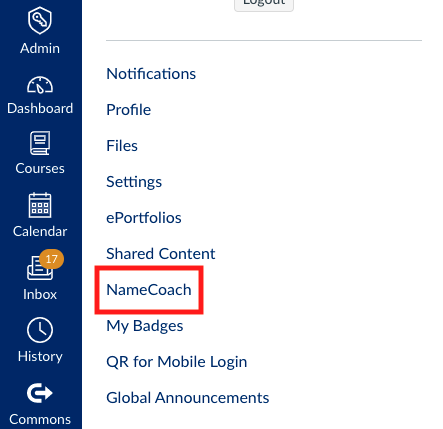
Click the “NameCoach” link.
Step 3
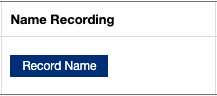
Within the window, click on “Record Name.”
Step 4
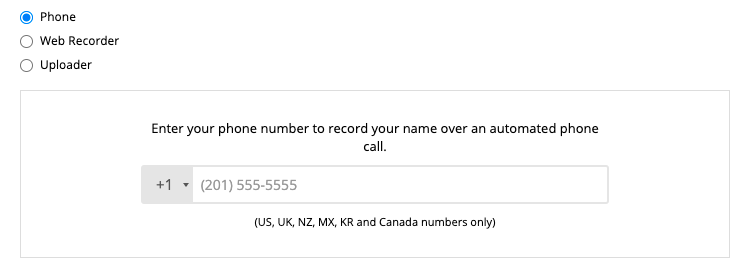
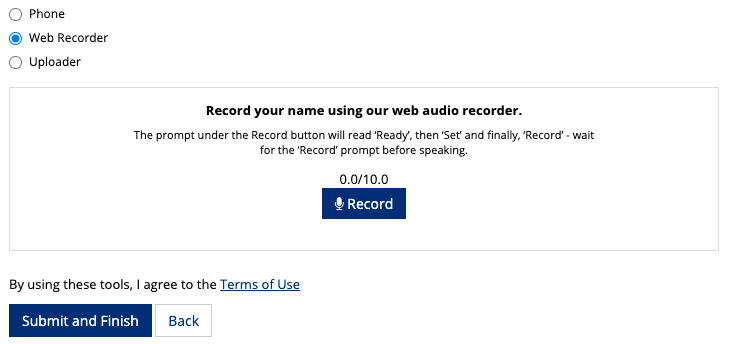
Select “Phone” or “Web Recorder” to record your name. You may re-record your name for any reason and at any time.
Phone Recording
Enter your phone number in the box provided, then click “Submit and Finish.”
It will call your phone and will prompt you with instructions. You will be able to listen to your recording and re-record if you wish.
After you complete the call, go back to the page in Canvas and click “Submit and Finish” to save your recording.
Web Recording
Click the “Record” button and wait for the prompt before speaking.
You can stop the recording, then click “Submit and Finish.”
After you submit, you are able to hear your recording and re-record if you would like.
Conclusion
Our names are important to us. They are central to all that is unique about us, and saying them correctly – especially in a learning environment – is the first step in embracing diversity, ensuring inclusivity, and promoting mutual respect.
NameCoach provides a simple solution to feeling welcomed and embraced in the classroom starting on Day 1!
Ellen Ott Marshall and her doctoral seminar students have recently embraced practice of public scholarship with their class blog. If you weren’t aware of Emory’s ScholarBlog platform, now is the time to check out this Emory-specific instance of WordPress. Any Emory user (student or faculty) can request a ScholarBlog at not cost, which can then be customized to the users individual needs.
For their work in class, students documented research projects they conducted as the culmination of a three-stage process. According to Dr. Marshall, “This course takes as its starting point Katie Cannon’s observation that the dominant tradition of western philosophical ethics assumes a moral agent with freedom and a wide range of choices. Cannon turns to the literature of African American women to study female protagonists who demonstrate moral agency under constraint. The first part of “Moral Agency under Constraint” employs this womanist methodology of drawing on protagonists in novels and films in order to re-consider assumptions about moral agency. The second part turns to ethnographic examples that describe constraints and perceive moral agency. The third part of the seminar focuses on students’ research projects and the contexts and models of agency they pursue.”
So what’s so valuable about this kind of project on ScholarBlog?
A blog component invites students to develop valuable professional skills in WordPress, a platform that introduces simple web design skills within a very user-friendly interface. No matter a student’s future vocation, basic conversance with web design will be an asset.
Blogs help students think about alternative audiences for their work, particularly focusing on the genre of public scholarship.
For graduate students in particular, this kind of work is also piece of digital scholarship that can be included on a CV or resume, demonstrating the skills referenced above in a clear and tangible way.
There are of course caveats, as there are with any digital tool in the classroom. An introduction to the WordPress system should come early in the semester, and there should be exploration with the tool throughout the semester to help students gain familiarity. Collaboration on initial posts for example, perhaps even in a full class session, lays the groundwork well. Additionally, students should be introduced to (or invited to explore) the genre of blogging, perhaps using examples of public scholarship initiated by fellow students or faculty at your institution. Students should know who they can contact for support (both technological and conceptual) throughout the process, and they should be encouraged to work with their classmates to leverage unique skills (you never know what tech skills are present in students until you ask)! I
Perhaps most importantly, if you introduce a digital tool in the classroom space, let it replace a different component of commensurate scale. Multimodal assignments like these can be incredibly enriching, but:
“be careful not to overload your students, especially if you’re not sure how much work the multimodal assignment will take”
Most Respondus problems are due to one of the following:
Firewall conflicts > turn off the firewall
Anti-Virus software conflicts > turn off the anti-virus program
Loss of internet connectivity > make sure you have a stable wifi connection
Other potential issues
Give the browser a few seconds to fully load the exam before clicking ‘Take the Quiz’. Clicking too soon has been reported as a potential cause of issues
Browse to the quiz from the Assignments page, or the Modules page.
Starting the exam
Prep:
Fully charge your laptop’s battery – plug into a power outlet if possible
Connect to EmoryUnplugged (using your NetID and password credentials), using EmoryGuest will create connection issues.
Step 1: Close all other programs
Step 2: Click on LockDown Browser Application
Mac users: Open the “Lockdown Browser” application. This can be found in your launchpad or applications folder in Finder.
Windows users: Locate the “LockDown Browser” shortcut from the desktop and double-click it. You can also find the application by searching in the “Start Menu” in the lower right corner of your screen.
Step 3: Within Lockdown, login to Canvas, navigate to your class and the exam you will be taking.
Step 4: Maximize your browser window – Some computers will reload a page if you resize the browser so it is best to begin with the window maximized.
During the Exam
Your answers will be automatically saved as you are working.
Be careful when using a mouse with a scroll wheel – Questions that have drop down menus can be accidentally changed with the scroll wheel if you’re not careful.
Timed Tests – If your test is timed, pay attention to the count down timer.
Avoid using the Back, Forward or Refresh buttons – Using these buttons reloads the page and could inadvertently lock you out of a single-attempt test. Give pages time to load.
Do not navigate to any other pages – This could cause an incomplete test to be submitted.
If you have any issues, contact your instructor immediately. Be concise and honest about what is happening, and they will let you know how to move forward.